The role of secondary sources (UpToDate) and search/general-purpose AI in answering clinical questions

Contents
*Note: This article was created by Codex (GPT-5 high), Claude Sonnet 4 (and a little bit by me).*
At present, answers from generative AI—including AI search tools—are roughly on par with a passable narrative review. Because they carry a high risk of selection bias and have only moderate validity, we should treat them as reference opinions for now. Comprehensive reviews, by contrast, search the literature exhaustively and make their methods explicit by following standards like PRISMA. Because they assess the quality of individual studies and quantitatively synthesize the results, they generally have low selection bias and high validity.
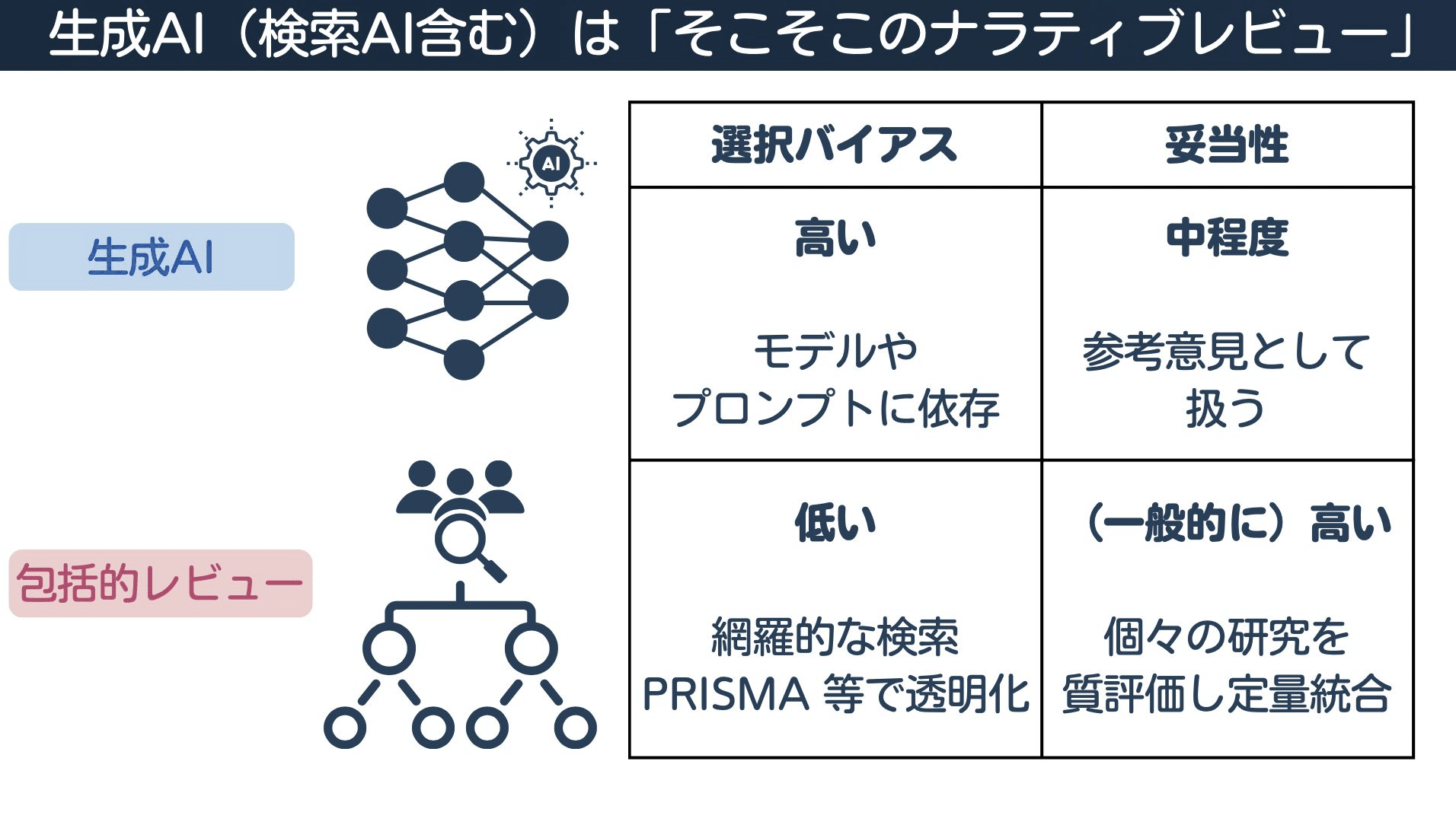
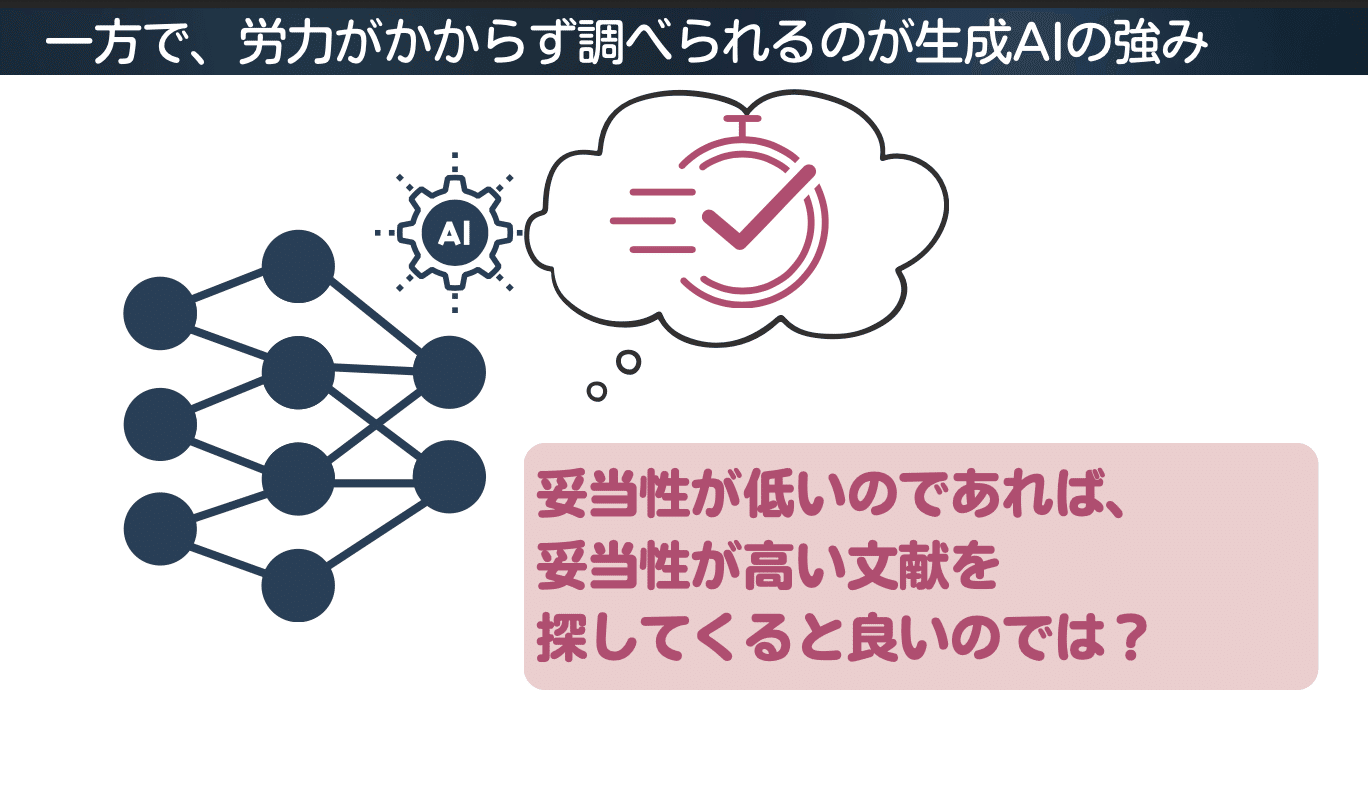
Even when using an AI search tool, the responsibility for evaluating the quality of the papers lies with the user. On the other hand, the strength of generative AI is that it lets you look things up with minimal effort. If an AI's direct answers have low validity, another approach is to use the tool to find literature with higher validity.
To support this approach, I created a Chrome extension for the medical information search AI OpenEvidence. It is currently under review at the Chrome Web Store, but for those who want to try it right away, here is how to install it manually. (The Chrome extension has now been approved.)
About OpenEvidence
OpenEvidence is a medical information platform for clinical decision support that emerged from Mayo Clinic Platform Accelerate. Through multi-year content agreements with the NEJM Group and the JAMA Network, it can incorporate licensed full-text and multimedia content into its answers with citations.
Developed primarily by researchers affiliated with Harvard and MIT, the platform requires verification and is restricted to healthcare professionals (free for US HCPs). It covers 160 specialties and over 1,000 diseases and therapeutic areas, searching across more than 35 million peer-reviewed papers to provide evidence.
According to the company, more than 40% of U.S. physicians log in daily, and more than 65,000 people sign up each month. It also reported a score of over 90% on the USMLE in 2023 and a score of 100% in August 2025.
Information sources in the (classic) 6S pyramid
Medical information retrieval uses a hierarchy known as the "6S pyramid." From top to bottom, the levels are: Systems (e.g., systems integrated into electronic health records), Summaries (secondary sources like UpToDate and DynaMed), Synopses of Syntheses (abstracts of systematic reviews, Cochrane Clinical Answers, etc.), Syntheses (systematic reviews, Cochrane Reviews, etc.), Synopses of Studies (brief summaries of primary research like RCTs with quality appraisals), and Studies (original articles, such as RCTs and cohort studies).
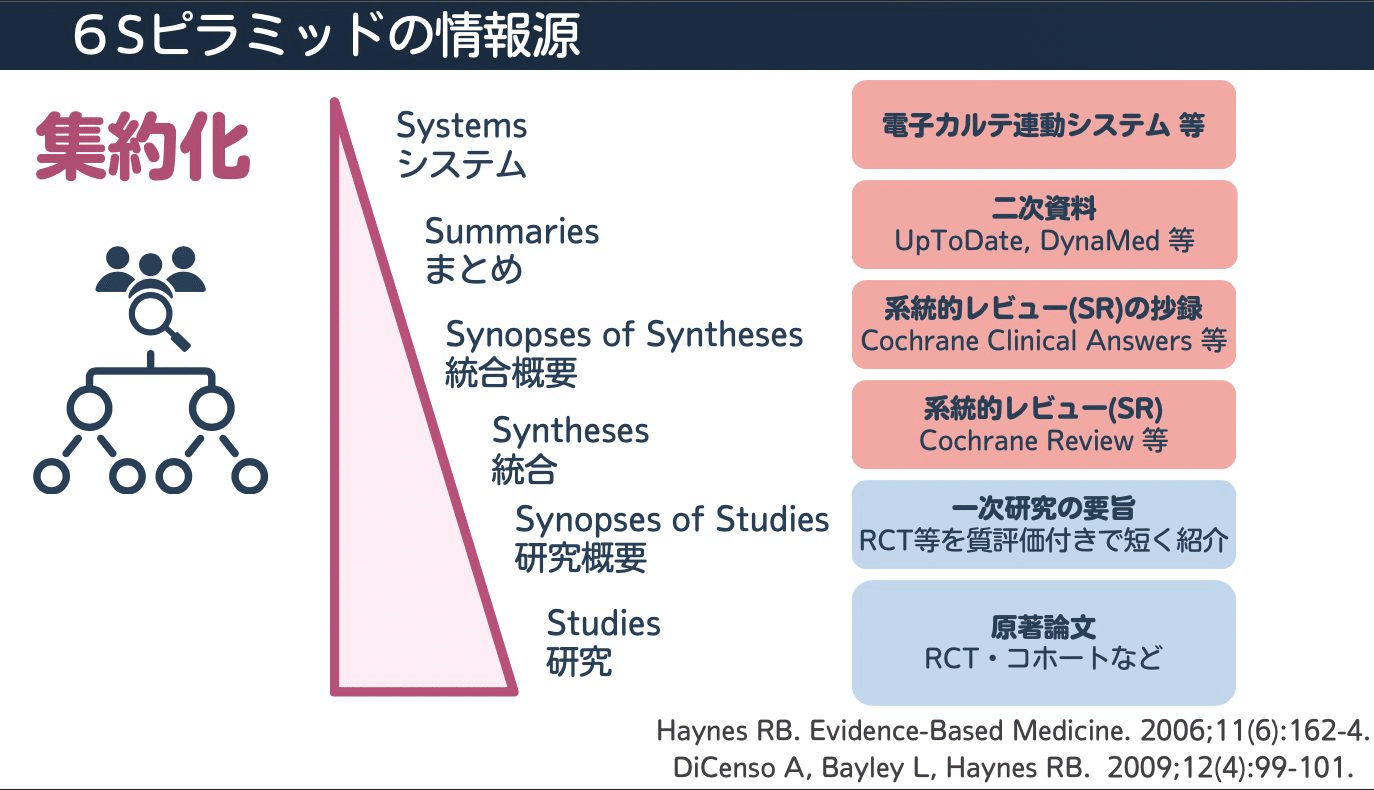
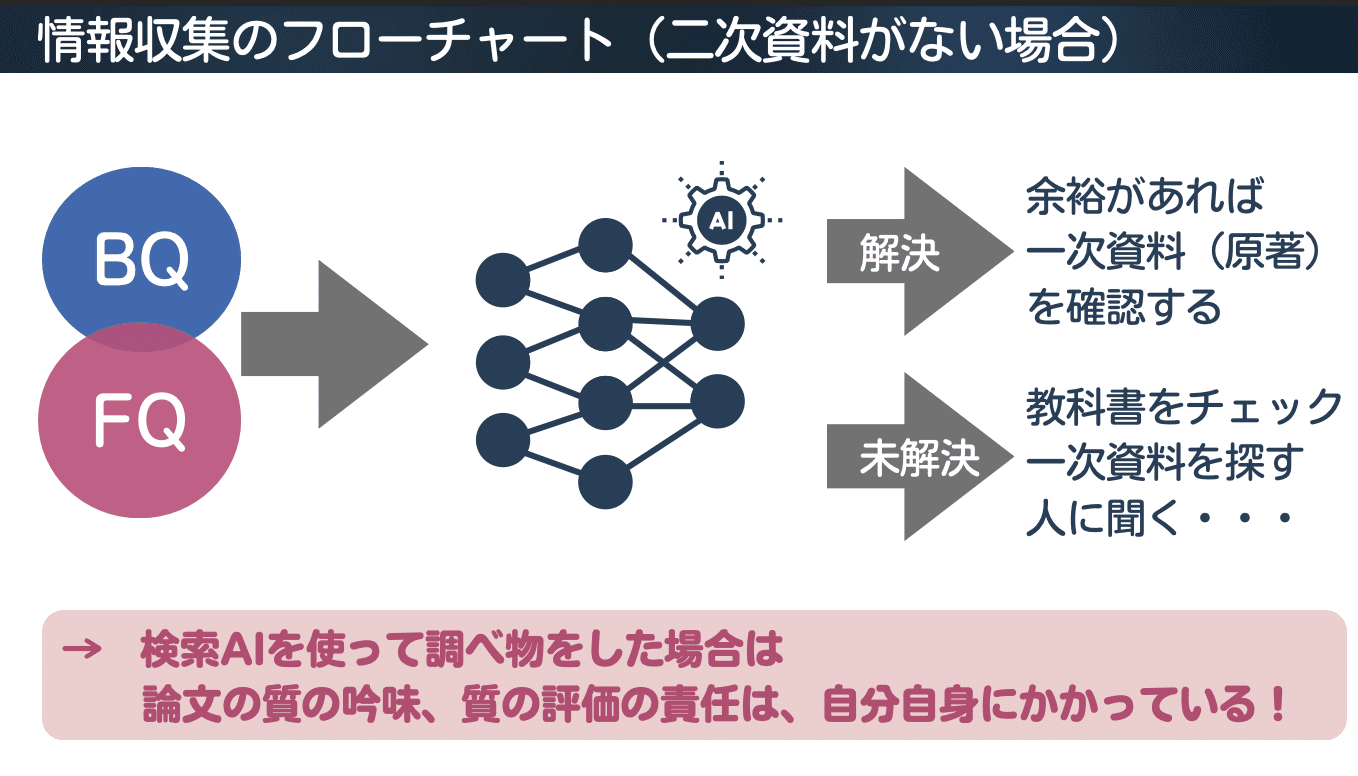
The higher an information source sits on the 6S pyramid, the less effort the reader has to spend critically appraising the research. In an information-gathering workflow, if secondary sources are available, you first search for Background Questions (BQs) or Foreground Questions (FQs) in secondary sources like UpToDate or DynaMed. If that resolves your question—and if you have time—you check the primary sources (original articles). If it does not resolve the question, you consult textbooks, search for primary sources, or ask a colleague.
(Addendum) Viewing SRs/MAs as a "lens"
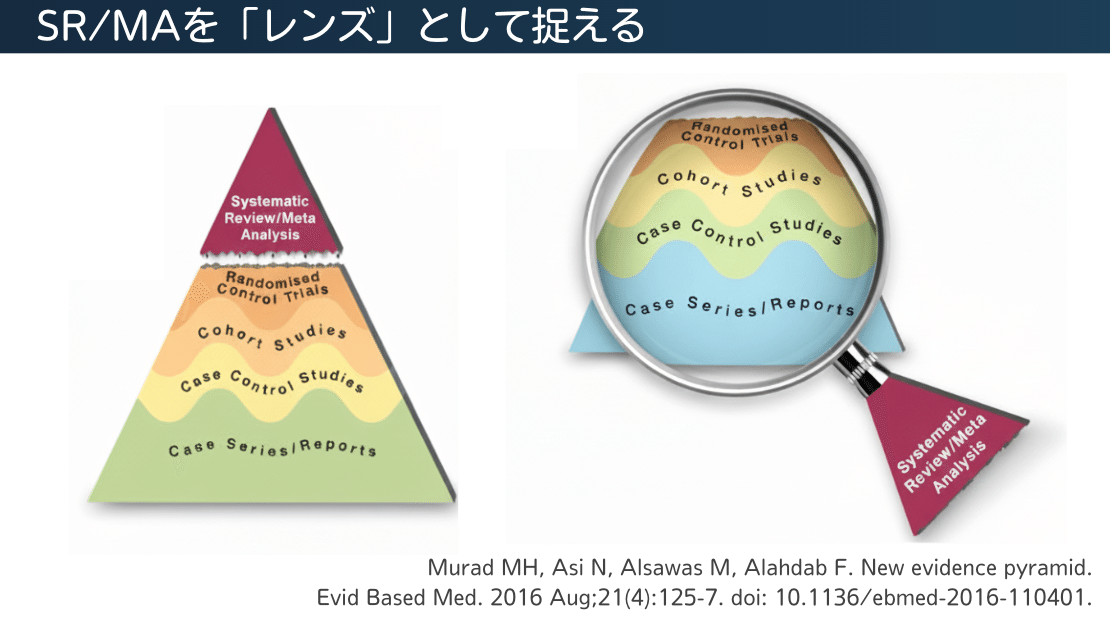
Recently, the mainstream view has shifted: instead of blindly trusting systematic reviews and meta-analyses (SRs/MAs) simply as the apex of the hierarchy, we now treat them as a "lens" or "tool" for critically appraising, synthesizing, and applying various studies (evidence) to clinical practice. Under this framework, SRs/MAs are removed from the pyramid itself and treated as tools for evaluating primary research.
This reversal in evidence quality shows that RCTs are not always superior to observational studies. For example, a large, high-quality observational study that carefully adjusts for confounding factors may yield more reliable results than a meta-analysis that pools low-quality RCTs with a high risk of bias. Today, evaluating the quality of evidence across different study designs is organized under the GRADE approach, and CoreGRADE was recently introduced to develop this framework further.
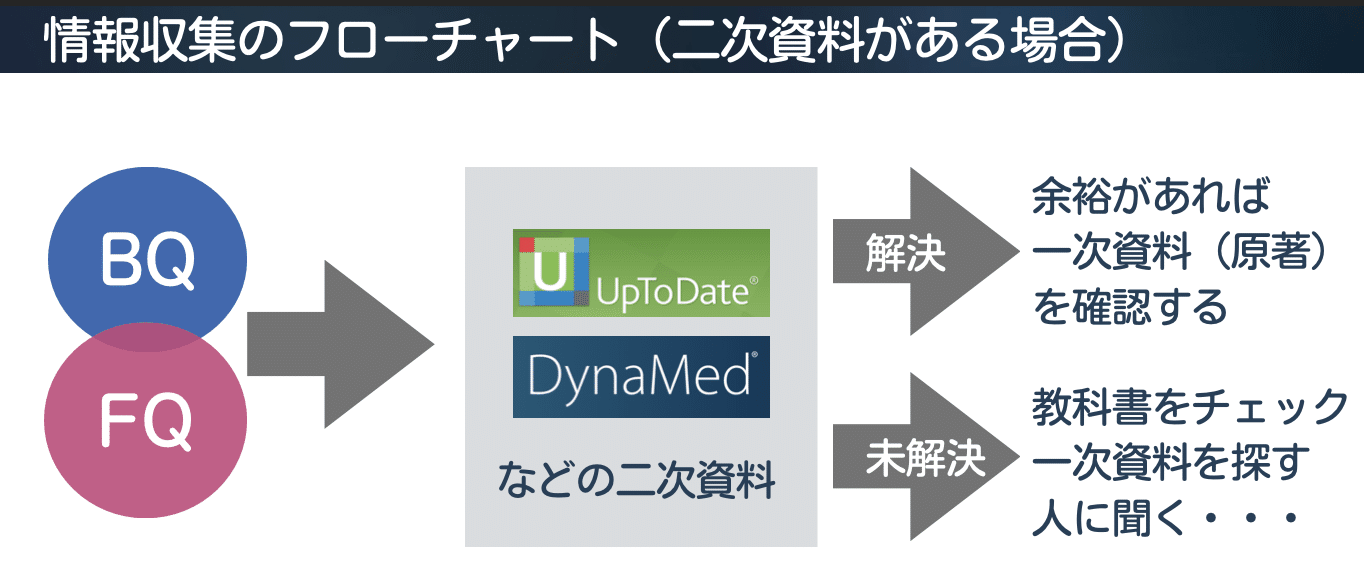
Conversely, when no secondary source is available and you use an AI search tool, you need to understand that you are responsible for critically appraising and evaluating the quality of the papers yourself.
Differences between UpToDate and OpenEvidence
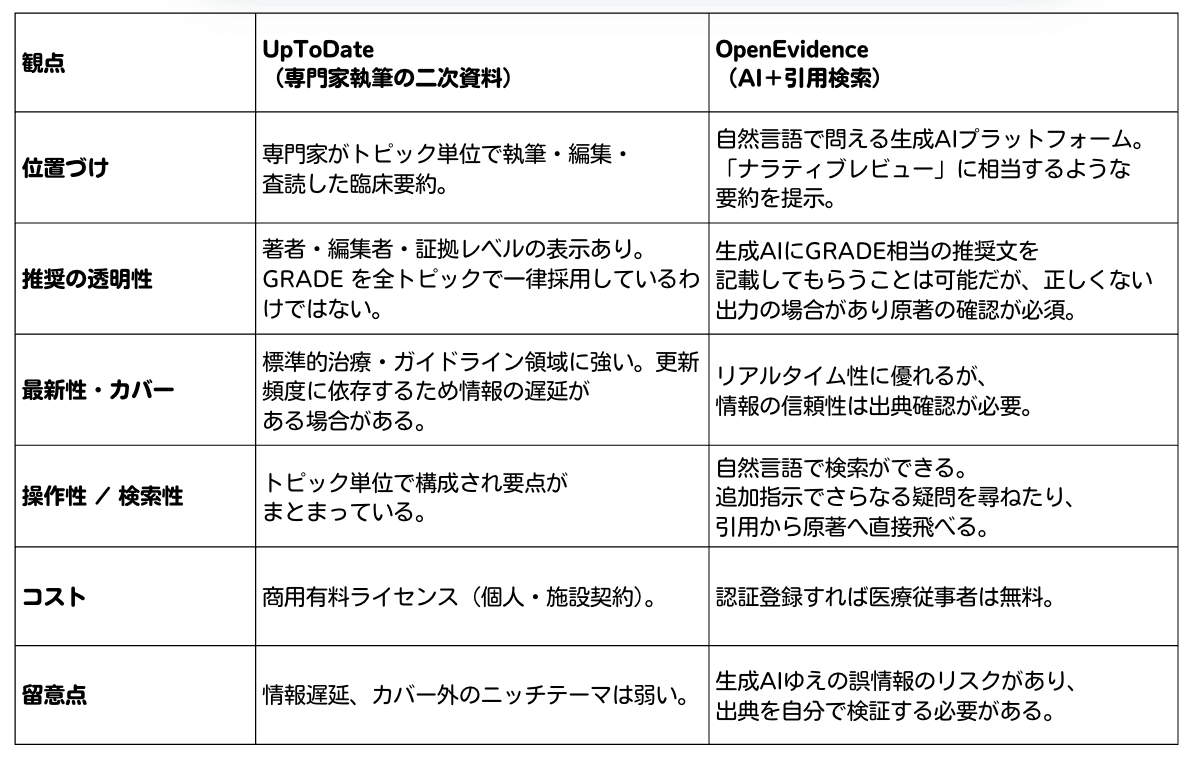
UpToDate is a secondary source written topic by topic by experts in the relevant field, and published after editing and peer review by section editors and a medical editorial staff. By integrating primary data with specialists' clinical experience, its content offers value not as a mere list of references, but as "collective intelligence" organized by experts into a form usable in clinical practice. Because it is editorially curated, it is highly reliable and easy to reference as a basis for clinical decisions.
OpenEvidence, on the other hand, is a generative AI platform that responds to natural-language queries by searching across academic literature and licensed content to instantly generate cited summaries. Because you can explore follow-up questions conversationally, it is well suited for finding the latest research or investigating highly specialized topics. It is also convenient to access and check the original papers directly from the provided citations.
When deciding how to use each tool, the key differences lie in how the content is created and who takes responsibility for it. Secondary sources like UpToDate have version control backed by expert authorship and editorial accountability, whereas OpenEvidence's output is a summary generated by a model and has not undergone a recommendation-setting process like the GRADE system.
Consequently, while OpenEvidence excels at efficient information retrieval and discovering the latest findings, the user must verify the accuracy of its citations and the validity of its interpretations.
In clinical practice, if you have access to a secondary source like UpToDate, an effective approach is to check recommendations in the secondary source while using OpenEvidence to supplement that information with the latest literature or studies on specific questions.
Prioritizing reviews in OpenEvidence
A prompt I have found effective in practice on OpenEvidence is to append the following to the end of my search query:
Provide a comprehensive explanation drawing on systematic reviews and meta-analyses (SR/MA), and list recommendations according to the GRADE system.
By doing this, you prioritize comprehensive reviews (SRs/MAs) that have already undergone human critical appraisal and synthesis, minimizing the risk of misinformation as much as possible. At the same time, having it organize recommendations in a GRADE-like format makes it easier to check the cited references you need to verify.
However, typing this prompt manually every time is tedious, so I developed a Chrome extension to automate the process.
Overview of the Chrome extension's features
This Chrome extension automatically appends a pre-configured prompt to the end of the search terms you enter. Its main features are as follows:
Supports multiple search triggers
Popup search: Click the extension icon to type and search directly
Right-click search: Select text on a webpage and search from the context menu
Address bar search: Type oe + space + your search terms to search instantly
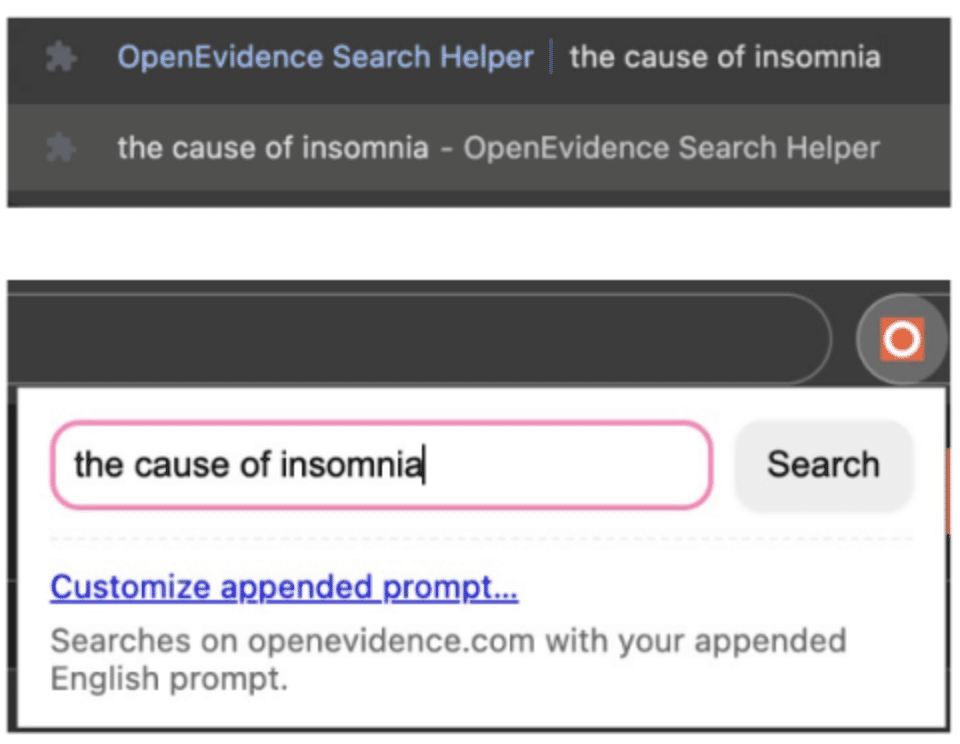
It automatically appends a prompt to the end of the terms you enter (for example, instructions to provide an explanation based on SRs/MAs and recommendations aligned with GRADE) and sends the query to OpenEvidence. Even if you only type "the cause of insomnia", for instance, the key is that it converts the query into something like this before searching:
the cause of insomnia — Provide a comprehensive explanation drawing on systematic reviews and meta-analyses (SR/MA), and list recommendations according to the GRADE system.
(It converts the query as shown above before running the search.)
Furthermore, when you try to search in Japanese on OpenEvidence, the standard OpenEvidence input field does not properly support Japanese IME input. As a result, pressing Enter to confirm Japanese character conversion frequently submits the query by mistake (which is quietly frustrating). This Chrome extension prevents those accidental submissions.
Whereas UpToDate requires you to read the text in English, OpenEvidence returns its output in Japanese when you search in Japanese, which is a welcome help during breaks in a busy clinic.
How to install
Because the extension is currently under review at the Chrome Web Store, you need to install it manually for now. Download "oesearch-mv3.zip" from GitHub at https://github.com/shoei05/oesearch/releases and extract it on your PC.
It is now live on the Chrome Web Store.
Please download it here.
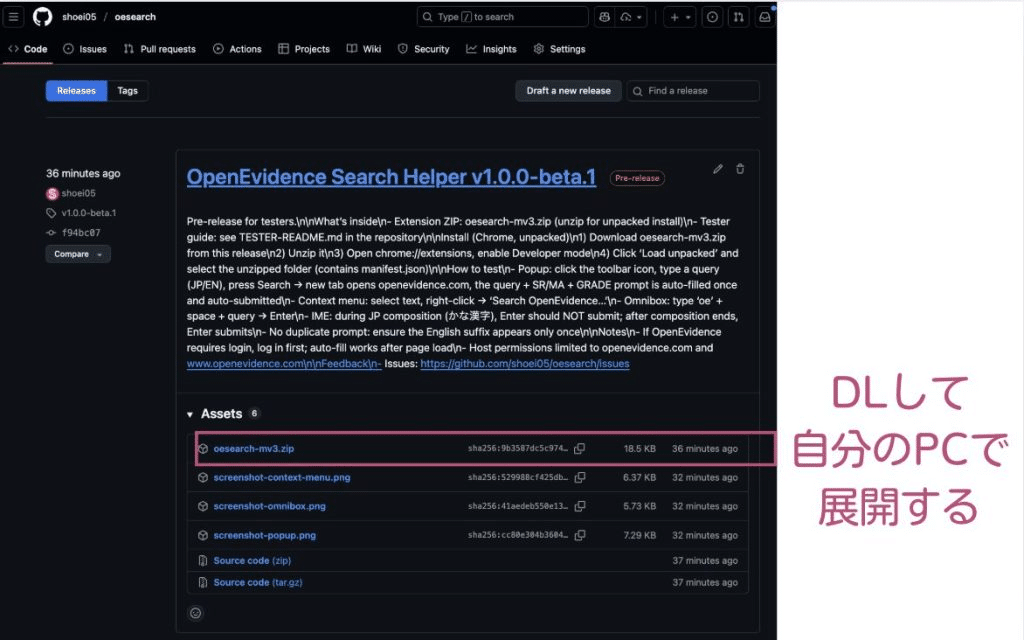
Next, open "chrome://extensions" in Chrome and turn on "Developer mode" in the top right corner. Then click "Load unpacked" and select the folder created when you extracted the downloaded zip file (the folder containing manifest.json).
(Update) It is now live on the Chrome Web Store.
Please download it here.
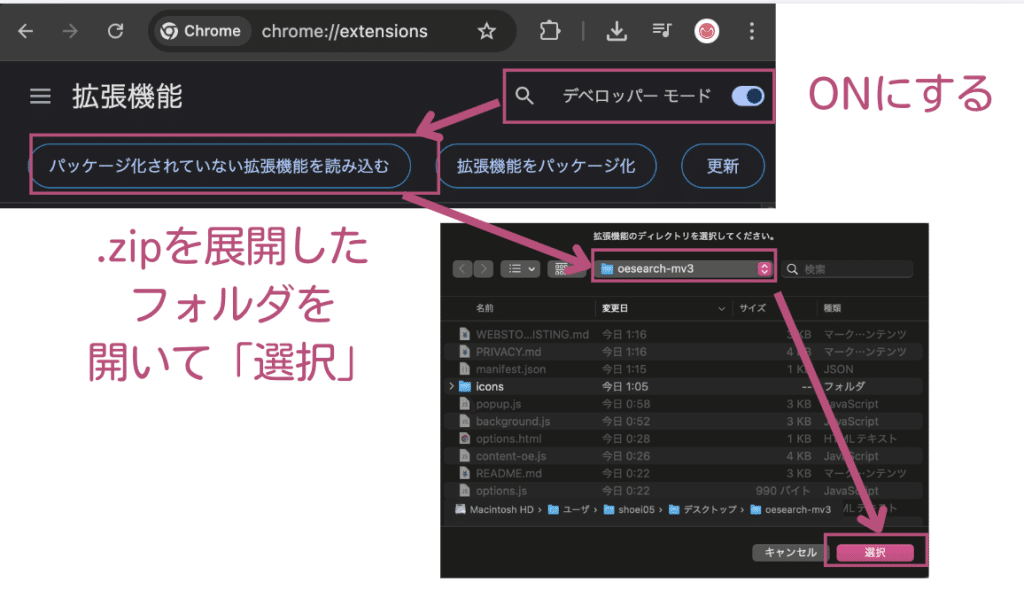
You can use it in three ways: a popup search by clicking the extension icon in the toolbar and entering your search terms; a right-click search by selecting text on a webpage and running it from the context menu; or an address bar search by typing "oe" + space + search terms + Enter in the address bar. You can customize the prompt by clicking the extension icon and selecting "Customize appended prompt…".
Notes and request for feedback
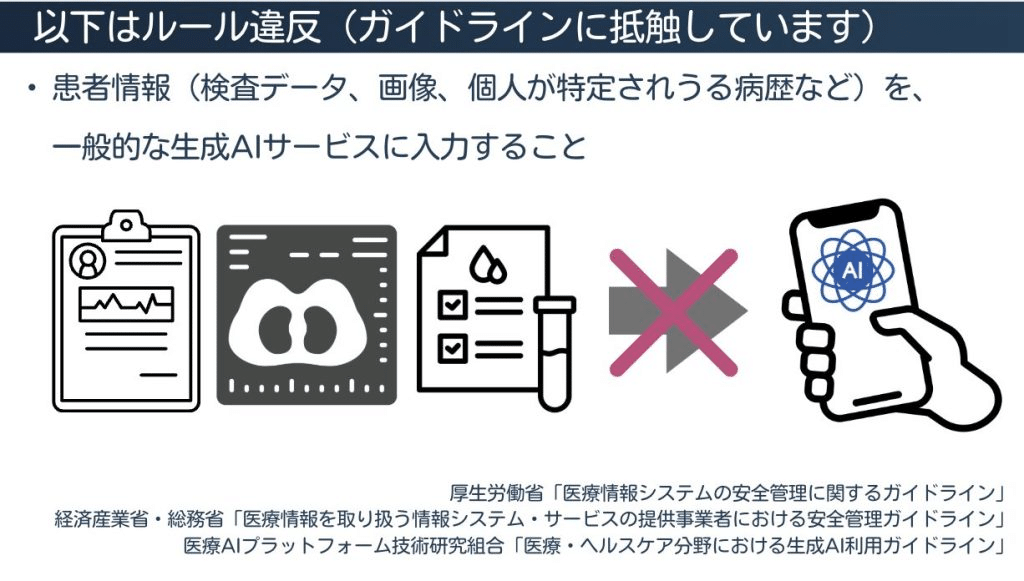
It is important never to enter patient personal information, to always check the cited references rather than taking AI answers at face value, and to use OpenEvidence only as a reference opinion for now. You also need to log in to OpenEvidence beforehand.
Please see the related article below if interested.
 Using generative AI in healthcare settings: Turning off model training is not always enoughshoei05.com
If you try the extension, please send feedback to https://github.com/shoei05/oesearch/issues on how much easier it made your searches, ideas for improving the prompts, features you would like to see, or any issues you ran into while using it.
Conclusion
OpenEvidence is a useful tool, but AI search should be treated strictly as a tool for rapid paper retrieval and summarization; healthcare professionals must make the final clinical decisions themselves after checking the cited literature. I hope this extension helps improve efficiency in busy clinical settings. Please wait a little longer for the official release on the Chrome Web Store.
Related articles
 OpenEvidence Search Helper: systematic reviews, GRADE, and Japanese inputshoei05.com
 What healthcare professionals should know first when using generative AIshoei05.com
 How to include references in Geminishoei05.com
 How to add references in Gemini (Part 2): Gem and prompt releasedshoei05.com