How to include references in Gemini

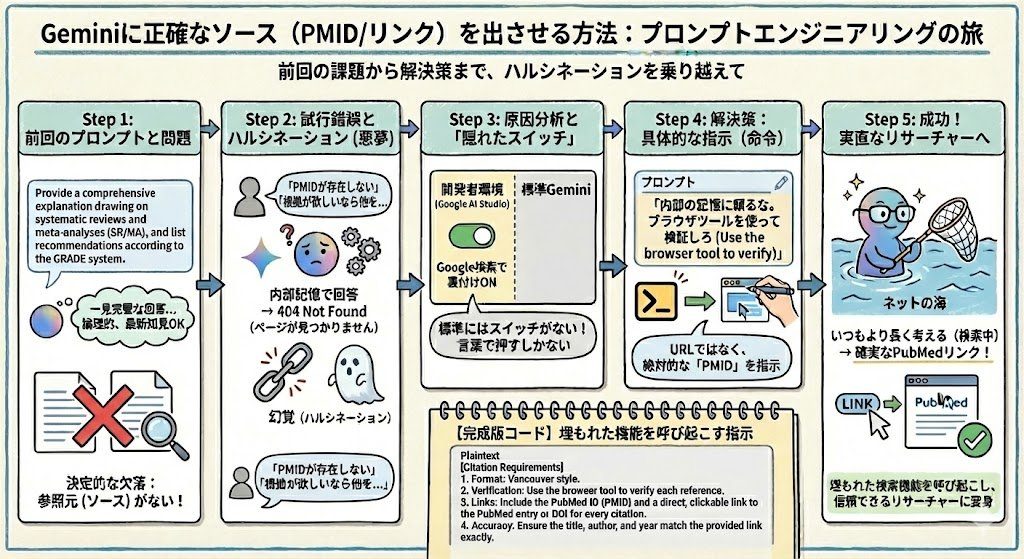
In my previous article, I introduced a prompt asking for a "comprehensive explanation following the GRADE system, based on systematic reviews and meta-analyses."
 Building a Chrome extension to get more out of OpenEvidenceshoei05.com
Let's try running this prompt in Gemini. The response looks perfect at first glance, but unfortunately, it does not provide its sources by default.
Gemini is by no means cut off from the internet. Even the standard interface has a built-in mechanism—known as RAG (Retrieval-Augmented Generation)—that searches the web in the background and integrates that information into its answers.
Being able to immediately verify the backing evidence should be the biggest advantage of using AI for search tasks. Yet with standard Gemini's default behavior, no sources are provided, leaving you with nothing more than plausible-sounding text.
So, you try asking it to "include links to the sources." When you do this, Gemini sometimes stops searching altogether and tries to answer solely from its internal memory. The title and authors might be correct, but the URL does not exist—a classic hallucination. Despite having excellent search capabilities, it fails at the very last step: presenting the evidence.
In fact, in the developer environment (Google AI Studio), you can explicitly enable "Grounding with Google Search." When turned on, this forces the AI to search the web and provide its sources. However, this setting is nowhere to be found in the standard Gemini interface.
If there is no setting, we have no choice but to instruct it through words. When using Gemini 3 for clinical searches, an effective way to get proper references seems to be forcing it to "search without relying on memory" and "base citations on unique IDs (PMID/DOI)." My impression is that telling it to "write" or "output" URLs or PMIDs increases the risk of hallucination. Try using the prompt below.
Provide a comprehensive explanation drawing on systematic reviews and meta-analyses (SR/MA), and list recommendations according to the GRADE system.
[Citation Requirements]
Format: Vancouver style.
Verification: Use the browser tool to verify each reference.
Links: Include the PubMed ID (PMID) and a direct, clickable link to the PubMed entry or DOI for every citation.
Accuracy: Ensure the title, author, and year match the provided link exactly.