Building a Chrome extension to get more out of OpenEvidence

Contents

*Note: This article was written by Codex (GPT-5 high) and Claude Sonnet 4 (with a little bit of input from me).*
To jump right in, generative AI (including AI search tools) currently operates at the level of a "passable narrative review." It carries high selection bias and only moderate validity, meaning we should treat its output as a reference opinion at this stage. Comprehensive reviews, on the other hand, rely on exhaustive searches made transparent through frameworks like PRISMA, assess the quality of individual studies, and synthesize them quantitatively. As a result, they generally have low selection bias and high validity.
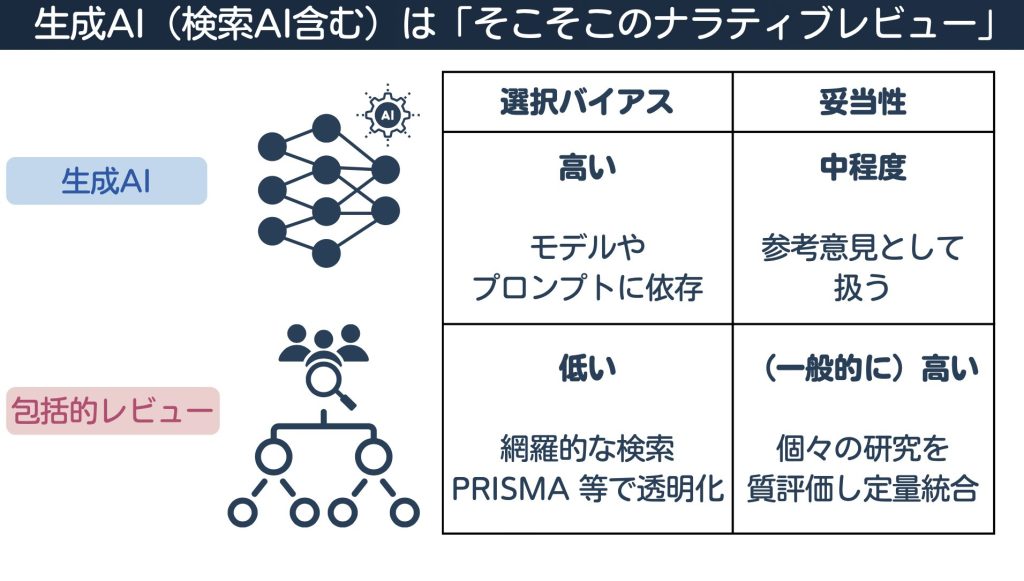
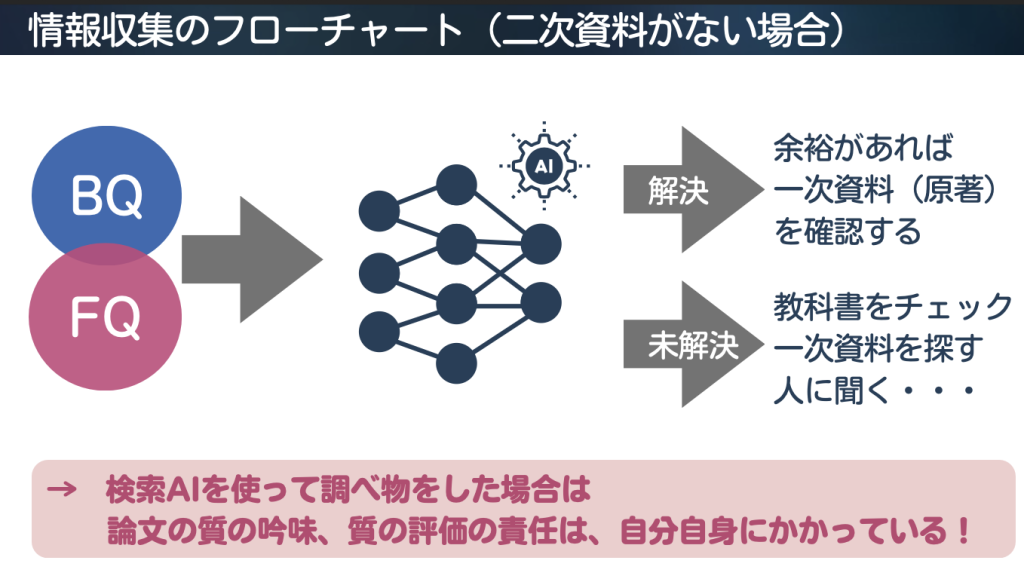
When you use an AI search tool to look something up, it is important to remember that the responsibility for critically appraising and evaluating the quality of the papers falls on you. That said, the strength of generative AI is that it lets you search with very little effort. If its inherent validity is low, one way around this is to have it search specifically for high-validity literature.
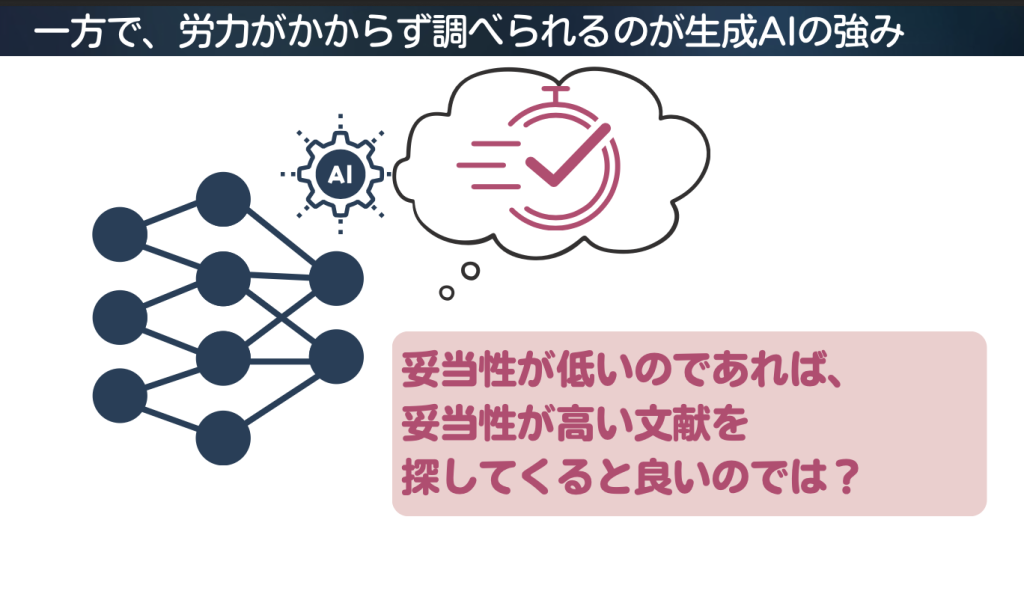
With this in mind, I developed a Chrome extension to make the medical information search AI OpenEvidence more efficient to use. It is currently under review for the Chrome Web Store, so I will walk through how to install it manually for those who want to try it right away.
OpenEvidence basics
OpenEvidence is a medical information platform for clinical decision support that emerged from Mayo Clinic Platform Accelerate. Having signed multi-year content agreements with NEJM Group and JAMA Network, it can incorporate licensed full-text and multimedia content into its answers with citations.
Development is led by researchers affiliated with Harvard and MIT. The platform requires verification and is restricted to healthcare professionals (free for US HCPs). It covers 160 specialties and over 1,000 diseases and therapeutic areas, searching across more than 35 million peer-reviewed papers to provide evidence.
According to the company, more than 40% of U.S. physicians log in daily, and more than 65,000 people sign up each month. It also reported a score of over 90% on the USMLE in 2023 and a score of 100% in August 2025.
Information sources in the 6S pyramid
Medical information retrieval uses a hierarchy called the "6S pyramid." From top to bottom, the tiers are Systems (such as EHR-integrated decision support), Summaries (secondary sources like UpToDate and DynaMed), Synopses of Syntheses (abstracts of systematic reviews, such as Cochrane Clinical Answers), Syntheses (systematic reviews, such as Cochrane Reviews), Synopses of Studies (brief, quality-appraised summaries of primary studies like RCTs), and Studies (original research papers, such as RCTs and cohort studies).
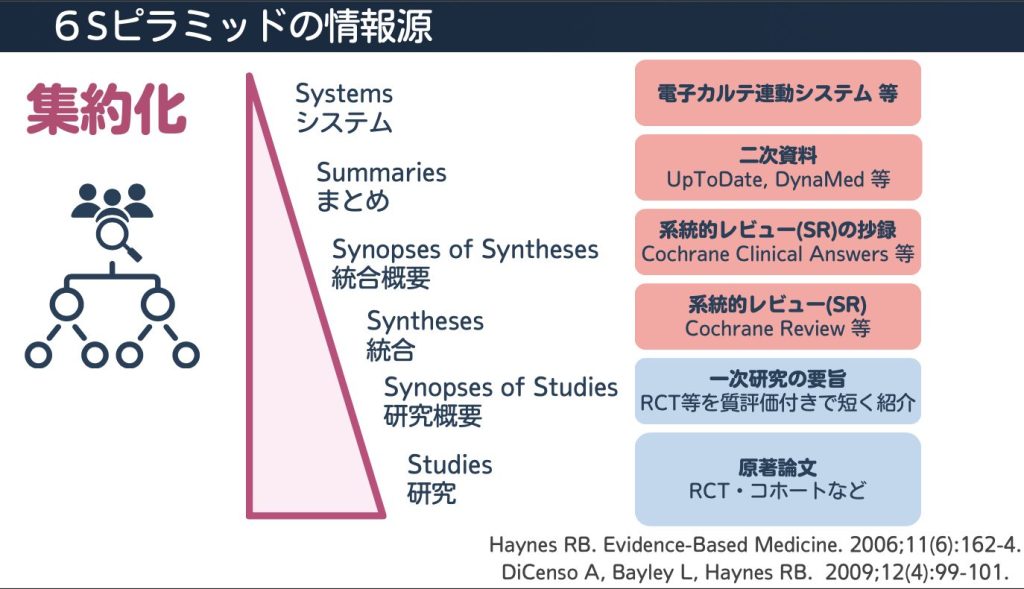
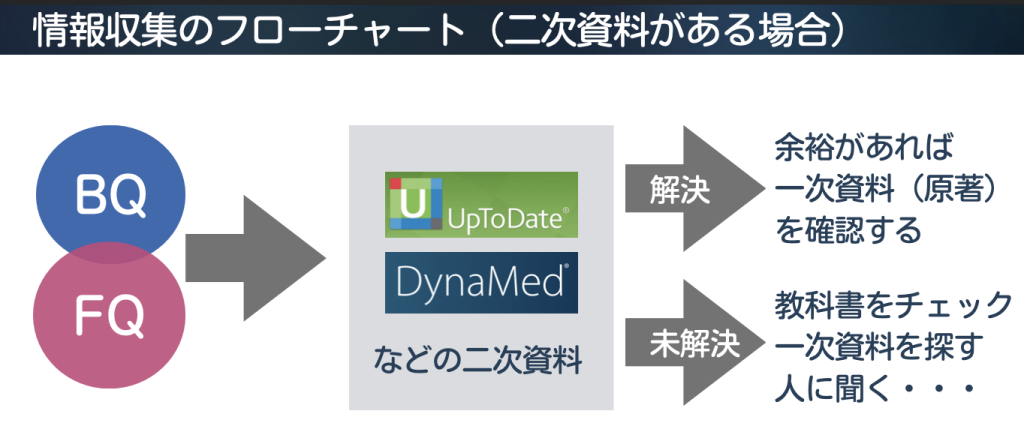
The higher you go up the 6S pyramid, the less effort you as the user have to spend on critical appraisal. In a typical information-gathering workflow, if secondary sources are available, you first search UpToDate or DynaMed for your Background Question (BQ) or Foreground Question (FQ). If that answers your question, you can check the primary literature (original papers) when time permits. If it remains unresolved, you check textbooks, search for primary literature, or ask a colleague.
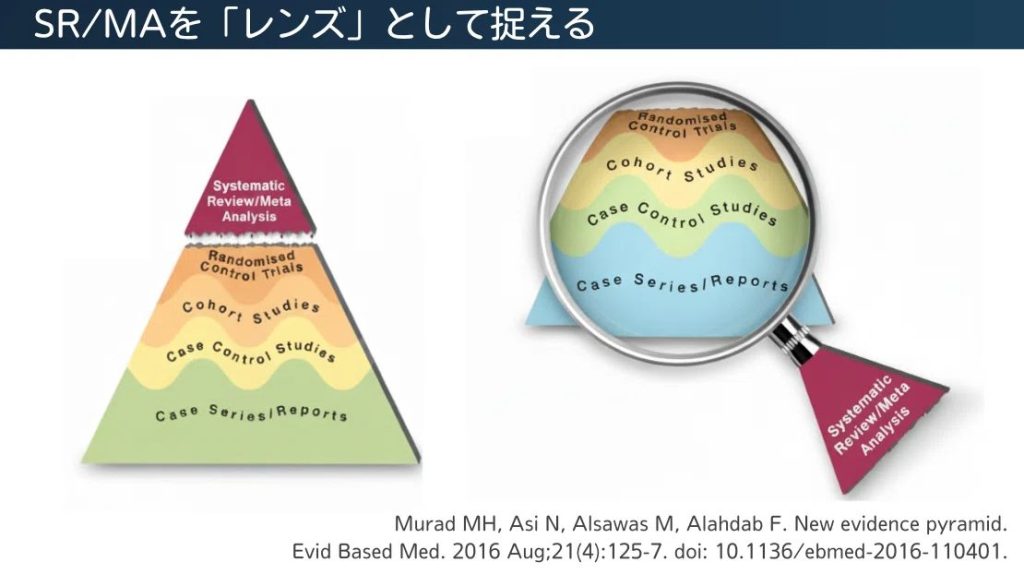
In recent years, however, the mainstream view has shifted away from blindly trusting systematic reviews and meta-analyses (SR/MAs) simply because they sit near the top of the hierarchy. Instead, they are viewed as a "lens" or "tool" for critically appraising, synthesizing, and applying various studies (evidence) to clinical practice. Under this framework, SR/MAs are removed from the pyramid itself and treated as tools for evaluating primary studies.
This inversion of evidence quality shows that RCTs are not always superior to observational studies. For example, a large, high-quality observational study with carefully adjusted confounders may yield more reliable results than a meta-analysis that pools low-quality RCTs with a high risk of bias. Today, evaluating the quality of evidence across different study designs is formalized in the GRADE approach, and CoreGRADE was recently introduced to develop this concept further.
When secondary sources are unavailable and you turn to an AI search tool, you need to understand that the responsibility for critically appraising and evaluating the quality of the papers rests entirely on you.
Differences between UpToDate and OpenEvidence
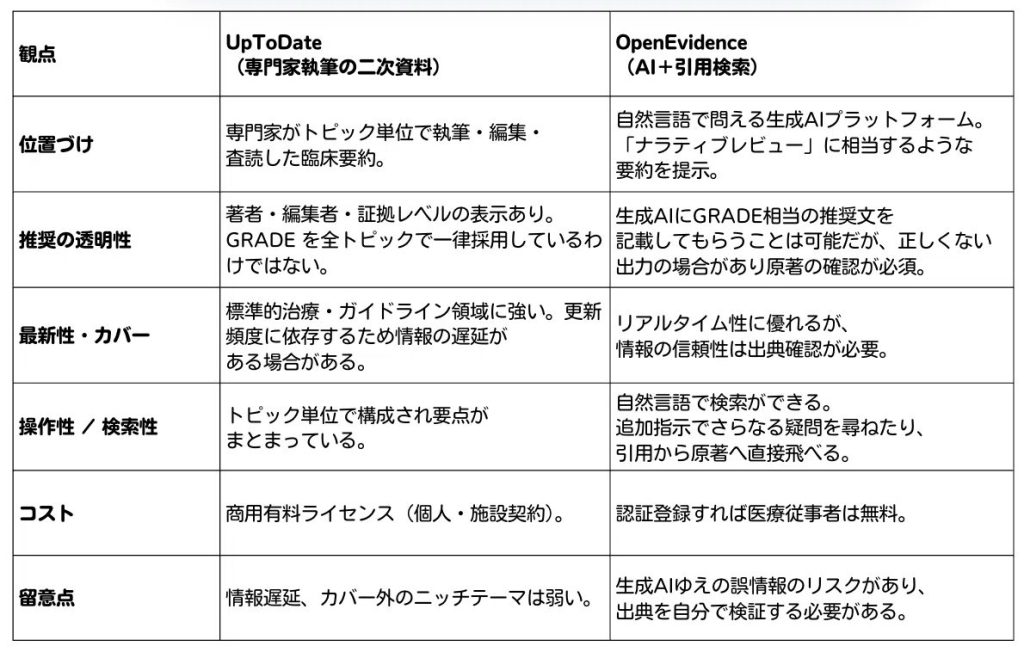
UpToDate is a secondary resource where specialists in the relevant field write each topic, which then undergoes editing and peer review by section editors and the medical editorial team before publication. By integrating primary data with specialists' clinical experience, the content offers more than a mere list of references; it holds value as "collective intelligence" organized for practical clinical use. Because it is editorially curated, it is highly reliable and easy to reference as a basis for clinical decisions.
OpenEvidence, by contrast, is a generative AI platform that responds to natural-language queries by searching across academic literature and licensed content to instantaneously generate cited summaries. Because you can drill down on follow-up questions conversationally, it excels at exploring the latest research or niche topics. Being able to jump directly to the original papers from the provided citations also makes it practical.
The crucial difference lies in how the two are created and where accountability rests. Secondary sources like UpToDate maintain version control backed by expert authorship and editorial responsibility, whereas OpenEvidence outputs summaries produced by a generative model that have not gone through a formal recommendation process like the GRADE system.
While OpenEvidence excels at efficient information retrieval and discovering the latest findings, the user must verify the accuracy of its citations and the validity of its interpretations.
For day-to-day clinical practice, if you have access to a secondary resource like UpToDate, a practical approach is to check recommendations there while using OpenEvidence to supplement your search with the latest literature or niche evidence.
The following articles also summarize this topic well and are worth a read.
Thinking about how to use OpenEvidence https://daily-cps.com/how-to-use-openevidence
Reconsidering how we use UpToDate https://daily-cps.com/why-we-use-uptodate/
Using OpenEvidence effectively
In my own use of OpenEvidence, I found it effective to append the following prompt
Provide a comprehensive explanation drawing on systematic reviews and meta-analyses (SR/MA), and list recommendations according to the GRADE system.
to the end of my search queries. By prioritizing comprehensive reviews—meaning SR/MAs that have already undergone human critical appraisal and synthesis—you can minimize the risk of misinformation. At the same time, having it lay out recommendations in a GRADE-like format makes it much easier to check which cited references you need to verify.
Typing this prompt by hand every time is tedious, however, so I built a Chrome extension to automate the process.
Chrome extension features
This Chrome extension automatically appends a preset prompt to the end of your search query. Its main features are as follows:
Supports multiple search triggers
- Popup search: Click the extension icon to type and search directly
- Right-click search: Select text on any webpage and search from the context menu
- Address bar search: Type `oe` + space + your search terms to search immediately
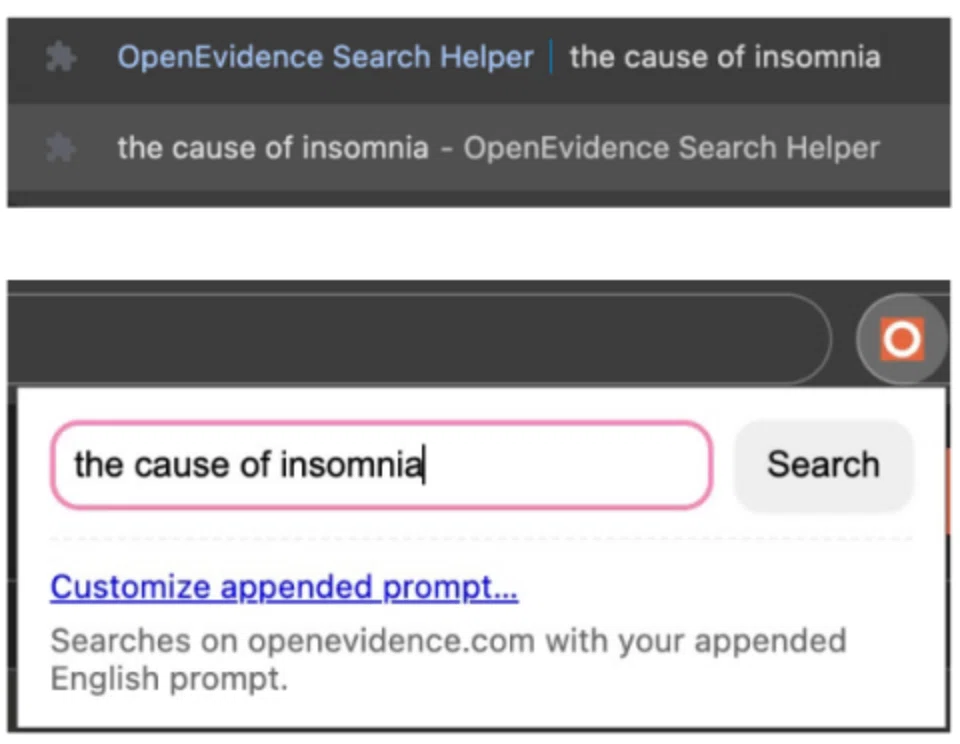
The extension automatically appends a prompt to the end of your input (for example, instructions to provide an explanation based on SR/MAs and recommendations aligned with GRADE) before sending it to OpenEvidence. Even if you only type "the cause of insomnia", for instance,
the cause of insomnia — Provide a comprehensive explanation drawing on systematic reviews and meta-analyses (SR/MA), and list recommendations according to the GRADE system.
the key point is that it converts the query like this before running the search.
Also, when you try to search in Japanese on OpenEvidence, the standard input field does not handle Japanese IME composition properly. Pressing Enter to confirm kanji conversion frequently submits the query by mistake, which is a constant minor annoyance, but this Chrome extension fixes that issue.
While UpToDate requires reading the text in English, OpenEvidence returns its output in Japanese when queried in Japanese, which is a welcome help during busy clinical shifts.
Installation instructionsBecause the extension is still under review for the Chrome Web Store, you currently need to install it manually. Download "oesearch-mv3.zip" from GitHub at https://github.com/shoei05/oesearch/releases and extract it on your PC. Next, open "chrome://extensions" in Chrome and turn on "Developer mode" in the top right corner. Then click "Load unpacked" and select the extracted folder (the one containing `manifest.json`).
It is now live on the Chrome Web Store.
Please download it here.
You can use it in three ways: popup search by clicking the extension icon on the toolbar and entering a query, right-click search by selecting text on a webpage and running it from the context menu, and address bar search by typing "oe", a space, your query, and pressing Enter in the address bar. You can customize the prompt by clicking the extension icon and selecting "Customize appended prompt…".
Please watch this video for a demo (reposted from above).
Precautions and request for feedback
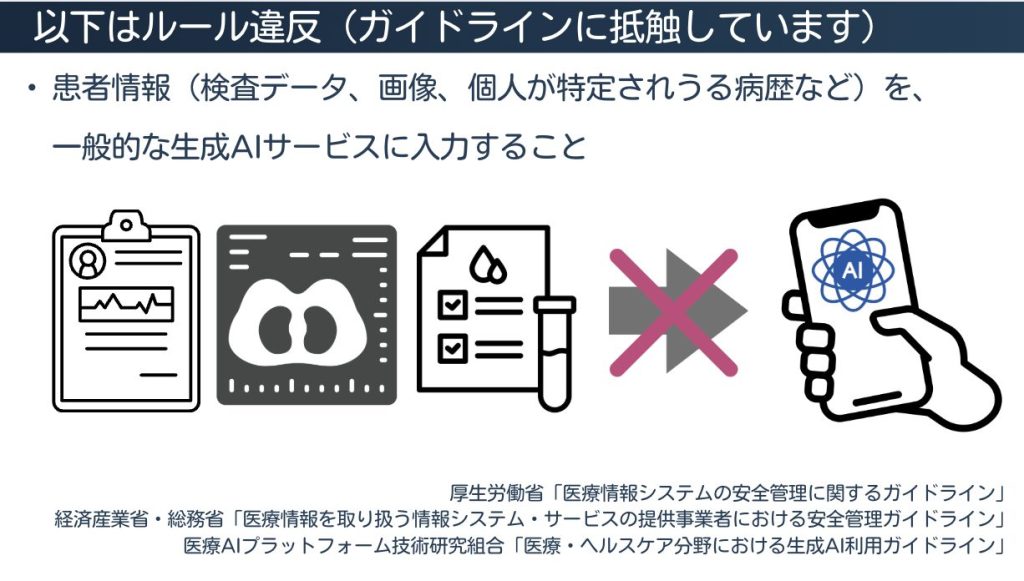
It is important that you never enter patient personal information, always check the cited literature rather than accepting AI answers at face value, and treat OpenEvidence strictly as a second-opinion reference for now. You also need to log in to OpenEvidence beforehand.
If you try this extension, please share your feedback at https://github.com/shoei05/oesearch/issues on how much it improves your search efficiency, suggestions for improving the prompt, other features you would like to see, or any issues you run into while using it.
Conclusion
OpenEvidence is a useful tool, but AI search should be treated strictly as a tool for fast literature search and summarization; healthcare professionals must make final clinical decisions themselves after checking the cited papers. I hope this extension helps improve efficiency in busy clinical settings. Please wait a little longer for the official release on the Chrome Web Store.