Installing RStudio ver. 1.4 with Docker
Contents
RStudio 1.4 has been released and is now available for use in Docker. A standout feature in 1.4 is the visual markdown editor. As for using third-party tools like Zotero, you can now easily cite sources from your library via an API.
Removing Docker images
To avoid using the cache, remove the Docker containers and images you are currently using.
If you are using Docker Compose
Please refer to this guide for instructions on how to use Docker Compose.
Connect via SSH using Terminal (on Mac). On Windows, use TeraTerm((Impress Corporation. Mado no Mori. Mado no Mori. Accessed February 21, 2021. https://forest.watch.impress.co.jp/library/software/utf8teraterm/)) or Windows Terminal((Summary of Features and Usage of the Finally Completed "Windows Terminal". @IT. Accessed February 21, 2021. https://www.atmarkit.co.jp/ait/articles/2005/28/news018.html)). For basic Linux commands, this resource((dotinstall. [Old Version] Introduction to UNIX Commands [General User Edition] (All 24 Lessons). Dotinstall. Accessed February 21, 2021. https://dotinstall.com/lessons/basic_unix_v2)) provides thorough video explanations. Basic commands are also explained in Kameleon's Docker course((Docker Course Taught from Scratch by a US AI Developer. Udemy. Accessed February 21, 2021. https://www.udemy.com/course/aidocker/)).
# 自分(Mac)の場合 /Users/user から /Users/user/Dropbox/docker へ移動

cd Dropbox
cd dockerCode language: PHP (php)
If you are using Windows and want to switch from the C: drive to the D: drive, enter:
D:Switch to the D: drive first, and then navigate to your target folder.
Once you are in the target folder, use the command below to remove everything created by the `up` command—images, containers, volumes, and networks (reference):
docker-compose down --rmi all --volumes --remove-orphansChecking the .yml file and Dockerfile
Let's review the `docker-compose.yml` file and `Dockerfile`.
docker-compose.yml
version: '3'

services:
  rstudio:
    build: .
    image: geo:geospatial
    container_name: geo
    ports:
      - 8787:8787
    environment:
      PASSWORD: YOUR_PASS
    volumes:
      - ../R:/home/rstudio
    tty: true
    stdin_open: trueCode language: JavaScript (javascript)
Here, we set the RStudio password using the `environment` option. Change `YOUR_PASS` to any password of your choice.
Dockerfile
Please refer to this article for details about the Dockerfile.
# ベースとするイメージ(任意のrocker/*に変更可能)
FROM rocker/geospatial:latest

# OS環境(rockerはdebianベース)に日本語ロケールを追加し切り替え
ENV LANG ja_JP.UTF-8
ENV LC_ALL ja_JP.UTF-8
RUN sed -i '$d' /etc/locale.gen \
  && echo "ja_JP.UTF-8 UTF-8" >> /etc/locale.gen \
    && locale-gen ja_JP.UTF-8 \
    && /usr/sbin/update-locale LANG=ja_JP.UTF-8 LANGUAGE="ja_JP:ja"
RUN /bin/bash -c "source /etc/default/locale"
RUN ln -sf  /usr/share/zoneinfo/Asia/Tokyo /etc/localtime

# 日本語フォントをインストール
RUN apt-get update && apt-get install -y \
  fonts-ipaexfont \
  fonts-noto-cjk

# {pacman}のインストール
RUN install2.r --error \
    pacmanCode language: PHP (php)
Here, we install `{pacman}` right from the start. If you do not need it, delete the last three lines.
Running docker-compose up -d
docker-compose up -dEnter the above to run Docker Compose.
Recreating geo(container_name) ... doneIf it finishes immediately with output like this, the cache is still remaining. Check once more to make sure no images are left behind.
docker imagesWith the command above, you can check the images that currently remain.
# docker rmi REPOSITORY:TAG で削除
docker rmi geo:geospatialCode language: CSS (css)
Remove the image using a command like the one above, and run `docker-compose up -d` again. Depending on your environment, this will take several minutes, so wait patiently.
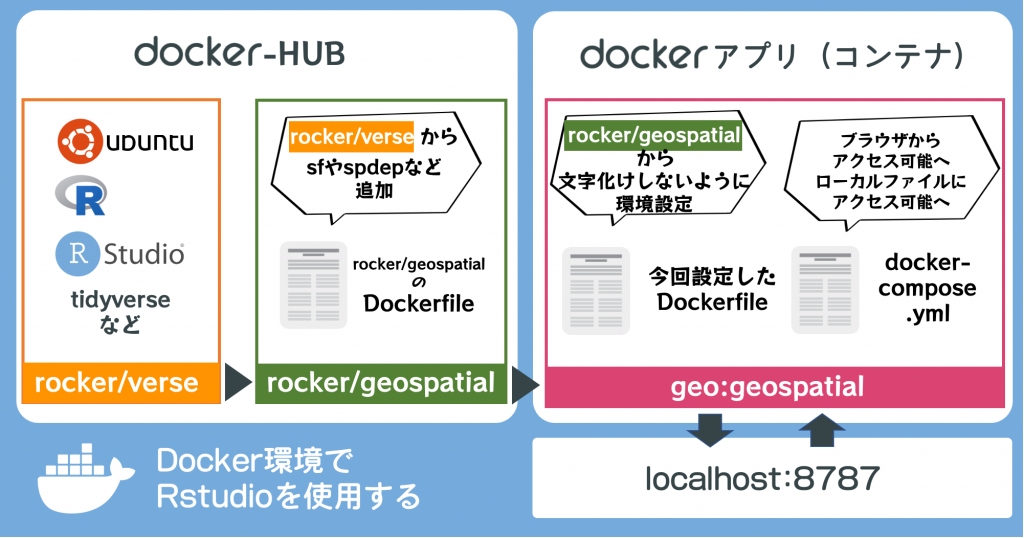
I have omitted the fine details, but the process looks roughly like this.
Checking the version
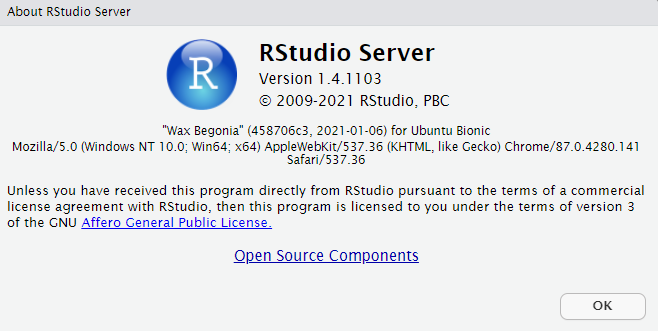
If no errors appear after entering the command above, RStudio has started successfully. Access RStudio at http://localhost:8787, and
if you can confirm from Help > About RStudio that it is Version 1.4, the installation is complete.
Professor @KunisatoY((KunisatoY (@KunisatoY) / Twitter. Twitter. Accessed February 21, 2021. https://twitter.com/KunisatoY)) has shared instructions on how to use the Zotero API in RStudio 1.4. I plan to review this separately at another time.
Regarding the Japanese input issues in RStudio 1.3, the method below remains effective in 1.4 as well. Alternatively, switching to the visual markdown editor mode seems to allow Japanese input without any problems.
Side note
On a side note, I recently participated in a group's *mokumoku-kai* (silent study session) for the first time.
A *mokumoku-kai* is a general term for a gathering where people meet in the same place and work or study independently and silently. The name is said to come from the Japanese word *mokumoku-to* (silently).((Pasona Tech, Inc. What is an Engineer's Mokumoku-kai? Is it Useful for Acquiring Knowledge and Networking? | For IT and Manufacturing Engineer Job Changes and Dispatch Information [Pasona Tech]. For IT and Manufacturing Engineer Job Changes and Dispatch Information [Pasona Tech]. Accessed February 21, 2021. https://www.pasonatech.co.jp/workstyle/column/detail.html?p=2282))
I personally tend to get caught up in immediate distractions and procrastinate on my highest-priority tasks. At the recent *mokumoku-kai*, because we had to present our results to everyone at the end of the session, the moderate pressure helped me get my tasks done. I hope to keep making use of opportunities like this.