How to display Japanese text while typing in a popped-out RStudio editor

(Update) The problem with entering Japanese text continues in version 1.4, though the workaround below still works just as it did in version 1.3 and earlier. Alternatively, switching to the visual markdown editor mode introduced in 1.4 seems to let you enter Japanese without issue.
Introduction
In the RStudio editor (the Source pane), Japanese text does not appear in the leftmost tab until you confirm the input conversion.
One workaround is to open a dummy editor tab first and open the file you actually want to edit in the second or a later tab (([mac] Rstudioで日本語入力時に入力文字が表示されない [Typed characters do not appear during Japanese input in RStudio on Mac]. Qiita. Accessed February 21, 2021. https://qiita.com/it_tan/items/91081a04d942b9b2cb99)). However, if you pop the editor out into a separate window, the uncommitted Japanese text stops appearing again.
How to display Japanese text while typing after popping out a window
See the video below.
- Pop out both the dummy editor (1) and the editor you want to work in (2).
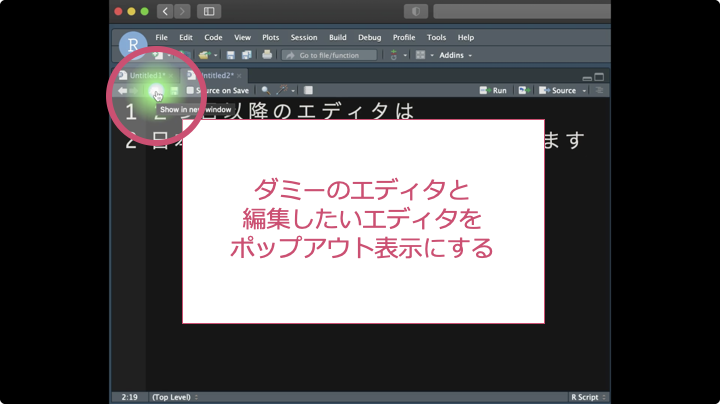
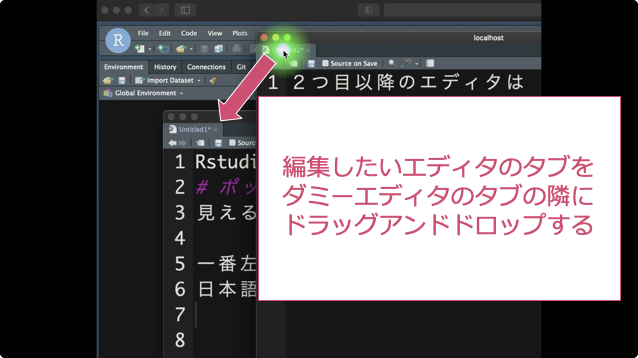
2. Drag and drop the tab of the editor you want to work in (2) next to the tab of the dummy editor (1).
3. Japanese text now appears again as you type in the editor you want to work in (2).
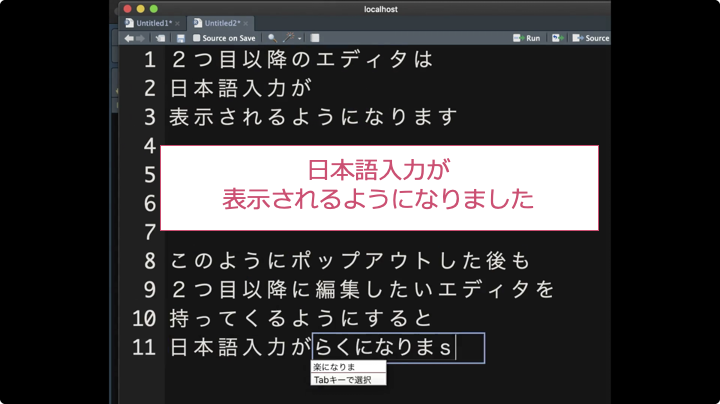
As shown here, even after popping out an RStudio editor window, you can drag and drop the tab to make uncommitted Japanese characters appear as you type, which makes working much easier. It is a simple fix, so give it a try.
On a side note, I use iMovie for video editing. If you want to encode videos from .mov to .mp4, ffmpeg is a handy tool to know, so I am sharing it here.
ffmpeg -i filename.MOV -pix_fmt yuv420p filename.mp4Code language: CSS (css)I have decided to post R tips that I use often. When using R for data wrangling, visualization, and analysis, I sometimes forget code I wrote earlier and end up on the same web pages every time I look it up. Whenever I find myself looking up the same trick repeatedly, wondering how it went, I will post it here from time to time. I hope you find these useful.